
安装
Sphinx是用Python写的, 你需要安装Python和Sphinx.
在 Python包索引 中 Sphinx包是一个可用包.
从水银的开发库,您也可以下载一个快照:
各种环境的介绍:
自己安装
If you use system installed Python or build your own Python, you can use that python to install Sphinx. The actual command list is same as these install.
Debian/Ubuntu: 使用封装系统安装Sphinx
You may install using this command if you use Debian/Ubuntu.
$ aptitude install python-sphinx
Mac OS X: 使用MacPorts安装Sphinx
If you use Mac OS X MacPorts , use this command to install all software.
$ sudo port install py27-sphinx
However, the execution path is not added, use select command to use Python2.7 as default.
$ sudo port select --set python python27
$ sudo port select --set sphinx py27-sphinx
Type which sphinx-quickstart to check the installation.
Windows: 安装Python和Sphinx
安装Python
Almost every Windows user do not have Python, we begin Python installation. If you already install python, please skip this section.
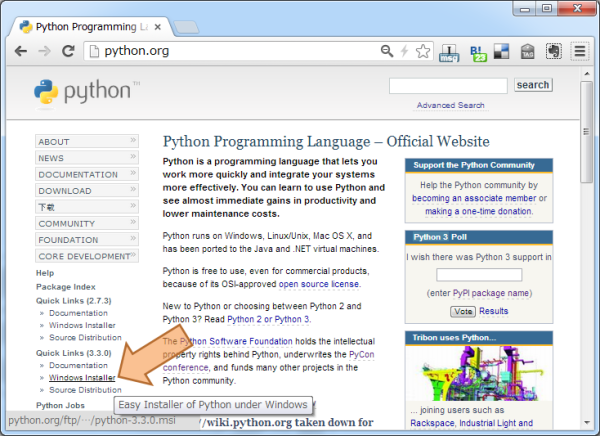
Go to http://python.org . This site is a headquarter of the Python. Look at Left sidebar and “Quick Links”, Click “Windows Installer” to download.
注解
Currently, Python has two version, 2.X and 3.X. Sphinx-1.2 can run under Python-2.5, 2.6, 2.7, 3.1, 3.2, 3.3. You may get some advice from ML or other places.
This chapter assumes Python-2.7.
Follow the normal Windows installer, the Python install will be completed.
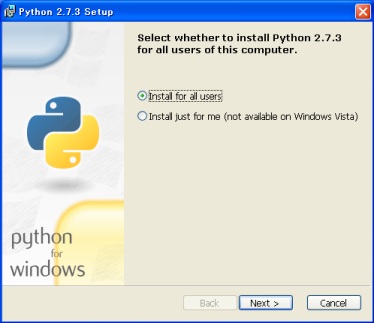
After installation, you have better to add PATH to the Environment Variable in order to run Python from Command Prompt.
- Right-Click the My Computer Icon and open Property Dialog
- Click Environment Variable button under detail tab
- Edit and add the path to the system variables PATH
Add these variables. This is for Python-2.7. If you use another version of Python, change the “27” number. Add these pathes separeted by ”;”.
| PATH | description |
|---|---|
| C:\Python27 | Folder which includes Python Command |
| C:\Python27\Scripts | Folder which includes easy_install (described later) or sphinx commands |
Run Command Prompt or enter cmd to the “search program and
files” text box. After command prompt window appear, type
python[Enter]. If you can get installed python version and prompt
about >>>, the Python installation is succeeded. Enter Ctrl+Z
key to quit.
安装easy_install命令
Python has very useful easy_install command which install 3rd party library.
easy_install downloads and install software which you want to need by only one command.
Save http://distribute.org/distribute_setup.py link by Right-click. Some browsers can download just open the URL. If you can read the file iteslf, calm down, Right-click and choose “Save”.
After download, invoke command prompt, go to the distribute_setup.py saved directory and run this command:
C:\> python distribute_setup.py
Now easy_insall command is installed. OK, Let’s go to the Sphinx install!
安装Sphinx
If you finshed easy_install install, for the rest is just a moment. Type this line.
C:\> easy_install sphinx
After installation, type sphinx-quickstart on the command
prompt. If you get interactive messages which starts with
Welcome to the Sphinx <version> quickstart utility.,
installation is succeeded. Quit by hitting Ctrl+C.
That it. Install is over. Let’s go to 第一次使用 to make Sphinx project.